

Trace any claim back to its source
Highlight a claim on any page and follow it back, source by source, to where it first appeared.
- Built by
- HEHamdan Esmail
- Type
- App
- Category
- Research & Academia
- Runs on
- TinyResearch ·TinyFetch ·TinySearch
- Published
- Nov 17, 2026
What it does
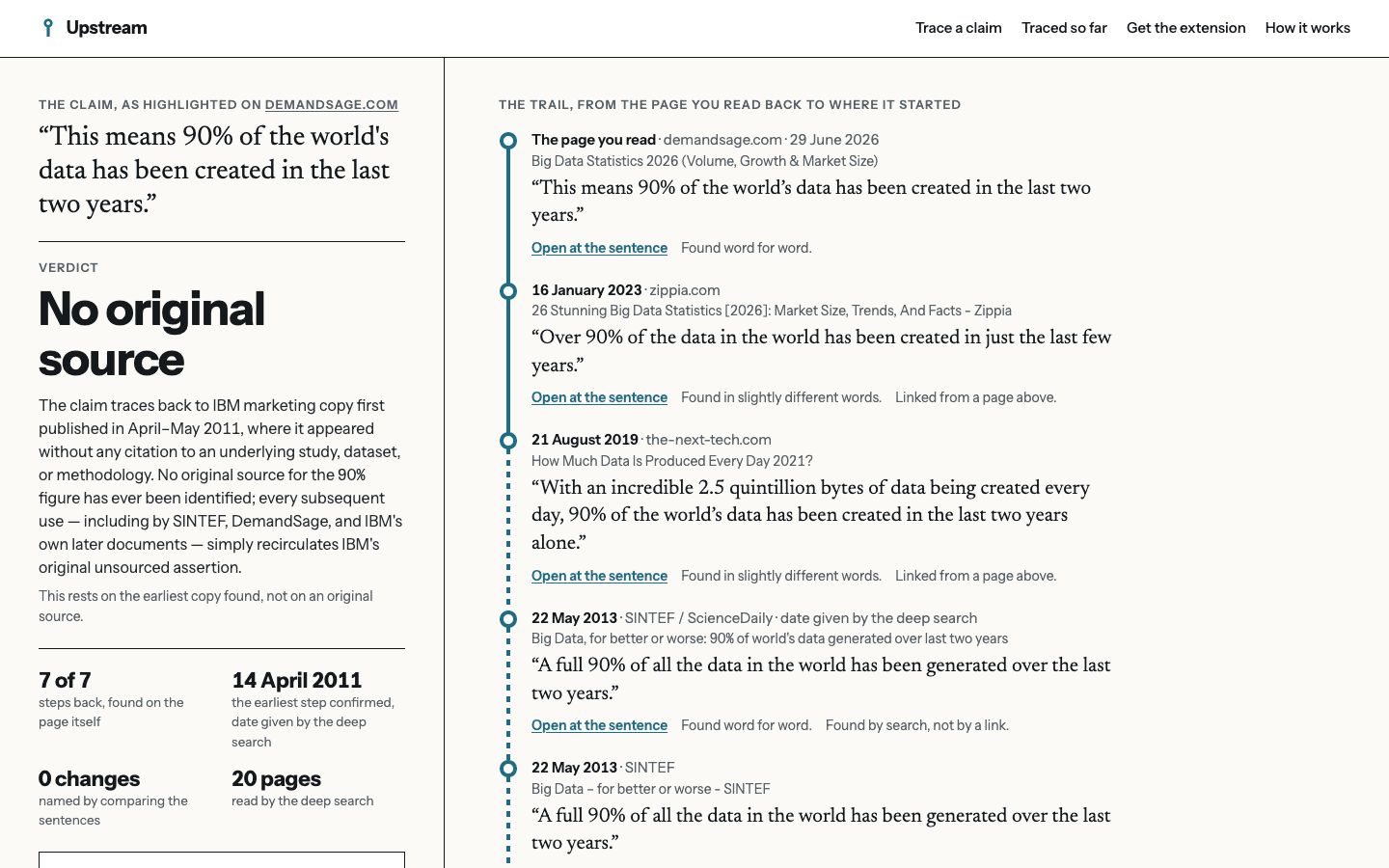
Upstream answers one question: where did that number come from? Highlight a claim on any page, and it follows it back, one source at a time, to where it first appeared. Every step is a real page, read again, with its date and its exact wording. Where the wording changed on the way, it says what changed, and when there is no original source, it says that too.
It runs as a Chrome extension and a web app. One of its trails follows the line that 90% of the world's data was created in the last two years back through eight pages to an advertisement from 2011.
How it uses TinyFish
TinyResearch searches wider when the links run out, to find where a claim really started.
TinyFetch reads every page on the trail again, along with linked pages and Internet Archive copies, so every link and date is checked rather than trusted.
TinySearch finds older pages that carry the same sentence.
How to use it
Open the live app, paste the page a claim is on and the sentence that makes it, and trace it upstream. Or install the Chrome extension and highlight a claim on any page.
Run it locally
Set up Upstream from the TinyFish Cookbook on my machine. 1. Clone https://github.com/HamdanEsmail/upstream.git. 2. Check I have Node.js 24 installed. 3. Run `cd upstream`, then `npm install`, then `cp .dev.vars.example .dev.vars`, then `npm run migrate:local`. 4. Start it with `npm run dev`. 5. Tell me when it is running.
Stuck? support@tinyfish.ai · TinyFish docs
A statistic gets repeated across a hundred articles and nobody checks where it came from. Upstream checks, step by step, and shows its working.
Winner of the Source Hunter launch bounty, built on TinyResearch.
Related builds
Browse all 24Research papers, read like manga
Ask a question, pick a real paper, and read it as a short manga where every claim links back to a verified quote.
Export your Canvas grades and files
Sign in once and export every Canvas grade, assignment and submitted file to CSV and JSON.
Fact-checks for viral claims
Paste a claim in English or Hindi and get a sourced verdict, with every quote checked against the page.